Taming the Queue: Practical Guide to Symfony Messenger, Redis, and the Demons That Haunt Message Brokers
22. 03. 2026
Message queues are one of those architectural decisions that feel simple until production starts throwing things at you. You push a message, a worker picks it up, runs some code, done. Beautiful. Then come the poison messages, the dead letters, the thundering herds, and the duplicate side effects — and suddenly you're staring at a queue that hasn't moved in six hours wondering what exactly went wrong.
This post walks through building a robust messaging setup with Symfony Messenger and Redis, then dives deep into the failure modes you will encounter and how to handle them properly.
Why Message Queues?
Before the code, the why. Message queues let you decouple the sender of work from the executor of work. Your HTTP request returns in 50ms, and some worker process chews through the heavy lifting asynchronously. You get resilience, retryability, and horizontal scalability almost for free.
Redis makes a solid backend for this — it's fast, widely available, and Symfony has first-class support for it through the Messenger component.
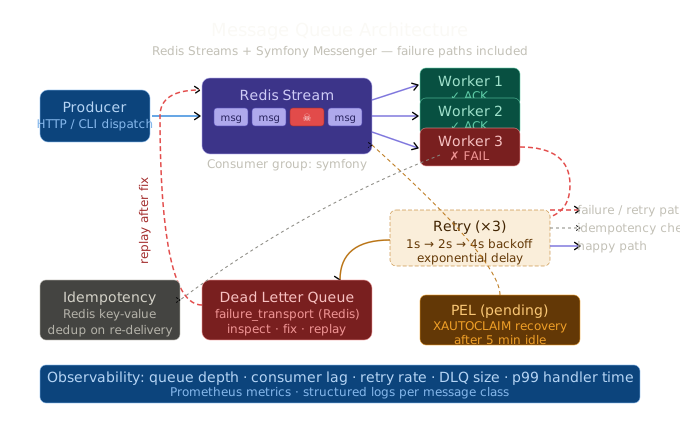
Setting Up Symfony Messenger with Redis Streams
Redis Streams (introduced in Redis 5.0) are a perfect fit for message queues. Unlike pub/sub (fire-and-forget) or plain lists (no consumer groups), streams give you persistent, acknowledged delivery.
Install the dependencies:
composer require symfony/messenger symfony/redis-messengerConfigure your transport in config/packages/messenger.yaml:
framework:
    messenger:
        transports:
            async:
                dsn: '%env(MESSENGER_TRANSPORT_DSN)%'
                options:
                    stream: 'messages'
                    group: 'symfony'
                    consumer: '%env(HOSTNAME)%'
                    auto_setup: true
                    delete_after_ack: true
                retry_strategy:
                    max_retries: 3
                    delay: 1000        # ms
                    multiplier: 2
                    max_delay: 0

            failed:
                dsn: 'redis://localhost:6379/failed'
                options:
                    stream: 'messages_failed'
                    group: 'symfony'

        routing:
            App\Message\SendEmailMessage: async
            App\Message\ProcessInvoiceMessage: async
Your .env:
MESSENGER_TRANSPORT_DSN=redis://localhost:6379/messagesA simple message class:
// src/Message/SendEmailMessage.php
namespace App\Message;

final class SendEmailMessage
{
    public function __construct(
        public readonly string $to,
        public readonly string $subject,
        public readonly string $body,
    ) {}
}
And its handler:
// src/MessageHandler/SendEmailMessageHandler.php
namespace App\MessageHandler;

use App\Message\SendEmailMessage;
use Symfony\Component\Messenger\Attribute\AsMessageHandler;

#[AsMessageHandler]
final class SendEmailMessageHandler
{
    public function __invoke(SendEmailMessage $message): void
    {
        // Send the email...
    }
}
Dispatch from anywhere:
$this->bus->dispatch(new SendEmailMessage(
    to: 'user@example.com',
    subject: 'Your invoice is ready',
    body: '...',
));
Run workers:
php bin/console messenger:consume async --time-limit=3600That's the happy path. Now let's talk about what goes wrong.
Problem 1: Poison Messages
A poison message is a message that consistently causes a worker to crash or hang — without ever being acknowledged. The broker re-delivers it, the worker crashes again, the broker re-delivers it... forever. It's the silent killer of queue throughput.
What causes them?
- A bug in the handler that throws an uncaught exception of a specific type
- A message referencing an entity that no longer exists in the database
- Malformed payload that fails deserialization
- A third-party service that consistently times out for this specific input
- A resource (memory, file handles) that only exhausts on this particular message
How Symfony Messenger handles them
Messenger's retry mechanism is your first line of defense. After max_retries attempts, the message is sent to the failure_transport:
framework:
    messenger:
        failure_transport: failed

        transports:
            async:
                retry_strategy:
                    max_retries: 3
                    delay: 1000
                    multiplier: 2
After 3 retries (with exponential backoff: 1s, 2s, 4s), the message lands in the failed transport instead of being retried forever.
You can inspect failures:
php bin/console messenger:failed:show
php bin/console messenger:failed:show 7  # show message with ID 7
And retry them manually after fixing the bug:
php bin/console messenger:failed:retry
php bin/console messenger:failed:retry 7  # retry specific message
Detecting poison proactively
Add a stamp counter to detect messages that have been retried too many times:
namespace App\EventListener;

use Symfony\Component\EventDispatcher\Attribute\AsEventListener;
use Symfony\Component\Messenger\Event\WorkerMessageFailedEvent;
use Symfony\Component\Messenger\Stamp\RedeliveryStamp;

#[AsEventListener]
final class PoisonMessageListener
{
    public function __invoke(WorkerMessageFailedEvent $event): void
    {
        $envelope = $event->getEnvelope();
        $stamps = $envelope->all(RedeliveryStamp::class);
        $retryCount = count($stamps);

        if ($retryCount >= 3) {
            // Alert the team
            $this->alerting->critical('Potential poison message detected', [
                'message_class' => $envelope->getMessage()::class,
                'retry_count' => $retryCount,
                'error' => $event->getThrowable()->getMessage(),
            ]);
        }
    }
}
Problem 2: Dead Letter Queues
A Dead Letter Queue (DLQ) is where messages go when they can't be processed — either because they exceeded retry limits, failed validation, or are otherwise unprocessable. The key insight: you don't want to lose messages. You want to park them somewhere you can inspect and reprocess them.
Symfony's failure_transport is your DLQ. But you should treat it seriously, not just as a bin.
Structuring the DLQ properly
transports:
    failed:
        dsn: 'redis://localhost:6379/dlq'
        options:
            stream: 'messages_dead_letter'
            group: 'dlq_consumers'
Adding context to dead-lettered messages
Use a custom middleware to enrich messages with failure context before they hit the DLQ:
namespace App\Messenger\Middleware;

use Symfony\Component\Messenger\Envelope;
use Symfony\Component\Messenger\Middleware\MiddlewareInterface;
use Symfony\Component\Messenger\Middleware\StackInterface;
use Symfony\Component\Messenger\Stamp\RedeliveryStamp;

final class DeadLetterEnrichmentMiddleware implements MiddlewareInterface
{
    public function handle(Envelope $envelope, StackInterface $stack): Envelope
    {
        try {
            return $stack->next()->handle($envelope, $stack);
        } catch (\Throwable $e) {
            $redeliveries = $envelope->all(RedeliveryStamp::class);

            // Log the enriched failure info for observability
            $this->logger->error('Message failed processing', [
                'class' => $envelope->getMessage()::class,
                'retry_count' => count($redeliveries),
                'last_error' => $e->getMessage(),
                'last_error_code' => $e->getCode(),
                'original_dispatched_at' => $redeliveries[0]?->getRedeliveredAt()?->format(\DATE_ATOM),
            ]);

            throw $e;
        }
    }
}
Replaying dead letters
When you've fixed the underlying bug, you can replay the DLQ:
# Retry all failed messages
php bin/console messenger:failed:retry --all

# Or one at a time with confirmation
php bin/console messenger:failed:retry
For high volumes, automate the replay with a custom command:
namespace App\Command;

use Symfony\Component\Console\Attribute\AsCommand;
use Symfony\Component\Console\Command\Command;
use Symfony\Component\Console\Input\InputInterface;
use Symfony\Component\Console\Output\OutputInterface;
use Symfony\Component\Messenger\Transport\TransportInterface;

#[AsCommand(name: 'app:dlq:replay', description: 'Replay DLQ messages from a given time range')]
final class ReplayDlqCommand extends Command
{
    public function __construct(
        private readonly TransportInterface $failedTransport,
        private readonly \Symfony\Component\Messenger\MessageBusInterface $bus,
    ) {
        parent::__construct();
    }

    protected function execute(InputInterface $input, OutputInterface $output): int
    {
        $replayed = 0;

        foreach ($this->failedTransport->get() as $envelope) {
            $this->bus->dispatch($envelope->getMessage());
            $this->failedTransport->ack($envelope);
            $replayed++;
        }

        $output->writeln("Replayed {$replayed} messages.");
        return Command::SUCCESS;
    }
}
Problem 3: At-Least-Once Delivery and Idempotency
Redis Streams with consumer groups give you at-least-once delivery: a message is delivered and acknowledged only after the handler confirms success. But this means a message can be delivered more than once — if your worker crashes after processing but before acknowledging.
The implication: your handlers must be idempotent.
Pattern: Idempotency keys
namespace App\MessageHandler;

use App\Message\ProcessPaymentMessage;
use Symfony\Component\Messenger\Attribute\AsMessageHandler;

#[AsMessageHandler]
final class ProcessPaymentMessageHandler
{
    public function __invoke(ProcessPaymentMessage $message): void
    {
        // Check if we've already processed this exact payment event
        if ($this->idempotencyStore->has($message->idempotencyKey)) {
            return; // Already processed, safe to discard
        }

        // Process the payment
        $this->paymentGateway->charge(
            amount: $message->amount,
            currency: $message->currency,
            customerId: $message->customerId,
        );

        // Mark as processed (with a TTL long enough to cover your retry window)
        $this->idempotencyStore->set($message->idempotencyKey, ttl: 86400);
    }
}
Using Redis as the idempotency store:
namespace App\Idempotency;

use Symfony\Component\Cache\Adapter\RedisAdapter;

final class RedisIdempotencyStore
{
    public function __construct(private readonly RedisAdapter $cache) {}

    public function has(string $key): bool
    {
        return $this->cache->getItem("idempotency:{$key}")->isHit();
    }

    public function set(string $key, int $ttl = 86400): void
    {
        $item = $this->cache->getItem("idempotency:{$key}");
        $item->set(true);
        $item->expiresAfter($ttl);
        $this->cache->save($item);
    }
}
Problem 4: Message Ordering
Redis Streams are ordered by default within a single stream. But once you have multiple workers consuming from the same stream, ordering between messages is no longer guaranteed — a slow worker might process message 2 while a fast worker is already on message 5.
For messages where order matters (e.g., processing a sequence of events for a single user), use message routing by key:
namespace App\Messenger\Routing;

use Symfony\Component\Messenger\Envelope;
use Symfony\Component\Messenger\Stamp\TransportNamesStamp;

final class UserRoutingMiddleware implements \Symfony\Component\Messenger\Middleware\MiddlewareInterface
{
    public function handle(Envelope $envelope, \Symfony\Component\Messenger\Middleware\StackInterface $stack): Envelope
    {
        $message = $envelope->getMessage();

        if ($message instanceof HasUserIdInterface) {
            // Route to a per-user stream to preserve ordering
            $transportName = 'async_user_' . ($message->getUserId() % 8); // 8 shards
            $envelope = $envelope->with(new TransportNamesStamp([$transportName]));
        }

        return $stack->next()->handle($envelope, $stack);
    }
}
Problem 5: Consumer Lag and Backpressure
A queue that grows faster than workers consume it is a ticking clock. Monitor your consumer lag actively.
# Check pending messages per consumer group
redis-cli XPENDING messages_stream symfony - + 100
Set up a Prometheus metric collector:
namespace App\Metrics;

use Prometheus\CollectorRegistry;

final class QueueMetricsCollector
{
    public function __construct(
        private readonly \Redis $redis,
        private readonly CollectorRegistry $registry,
    ) {}

    public function collect(): void
    {
        $gauge = $this->registry->getOrRegisterGauge(
            'app', 'messenger_queue_depth', 'Number of pending messages',
            ['transport', 'group']
        );

        // XLEN gives total stream length
        $depth = $this->redis->xLen('messages');
        $gauge->set($depth, ['transport' => 'async', 'group' => 'symfony']);

        // XPENDING gives how many are unacknowledged
        $pending = $this->redis->xPending('messages', 'symfony');
        $gauge->set($pending[0] ?? 0, ['transport' => 'async_pending', 'group' => 'symfony']);
    }
}
When lag spikes, scale workers horizontally:
# Docker Compose example
docker compose up --scale worker=5 -d
Or with Supervisor:
[program:messenger-consume]
command=php /app/bin/console messenger:consume async --time-limit=3600
numprocs=5
autostart=true
autorestart=true
Problem 6: Stuck Pending Messages (PEL Buildup)
Redis Streams track pending messages in the Pending Entries List (PEL) — messages delivered to a consumer but not yet acknowledged. If a worker crashes hard (SIGKILL, OOM), its pending messages are stuck in the PEL indefinitely.
Symfony Messenger handles this via messenger:consume, but you can also claim them manually or via a cleanup job:
namespace App\Command;

use Symfony\Component\Console\Attribute\AsCommand;
use Symfony\Component\Console\Command\Command;
use Symfony\Component\Console\Input\InputInterface;
use Symfony\Component\Console\Output\OutputInterface;

#[AsCommand(name: 'app:messenger:recover-stuck')]
final class RecoverStuckMessagesCommand extends Command
{
    private const IDLE_THRESHOLD_MS = 300_000; // 5 minutes

    protected function execute(InputInterface $input, OutputInterface $output): int
    {
        // Claim messages that have been pending for more than 5 minutes
        $pending = $this->redis->xAutoClaim(
            'messages',
            'symfony',
            'recovery-worker',    // claim under this consumer name
            self::IDLE_THRESHOLD_MS,
            '0-0',               // start from beginning
        );

        $output->writeln(sprintf('Recovered %d stuck messages.', count($pending[1] ?? [])));

        return Command::SUCCESS;
    }
}
Observability Checklist
Before going to production, make sure you have answers to:
- Queue depth per transport — how many messages are waiting?
- Consumer lag — how old is the oldest unprocessed message?
- Retry rate — what percentage of messages require at least one retry?
- DLQ size — are messages accumulating in the failure transport?
- Processing time p99 — are handlers getting slower over time?
- Error rate by message class — which messages are failing most?
Log structured data from every handler failure:
$this->logger->error('Message handler failed', [
    'message_class' => $message::class,
    'error' => $exception->getMessage(),
    'trace' => $exception->getTraceAsString(),
    'retry_count' => count($envelope->all(RedeliveryStamp::class)),
]);
Summary
| Problem | Mitigation |
|---|---|
| Poison messages | Retry with exponential backoff + failure transport |
| Dead letters | Treat DLQ as first-class; enrich with context; replay after fixes |
| Duplicate processing | Idempotency keys stored in Redis |
| Message ordering | Shard streams by entity key |
| Consumer lag | Monitor PEL; scale workers horizontally |
| Stuck messages | XAUTOCLAIM recovery job; Supervisor autorestart |
Message queues shift complexity from synchronous request handling to asynchronous failure handling. That's a good trade — but only if you instrument the failure paths as carefully as the happy path. With Symfony Messenger and Redis Streams, you have all the tools. Now you know what to do when they bite you.